펜션 만들기 추가질문3
정말 감사합니다 도움주셔서
데이터베이스에 입력된 정보가 나오긴하나
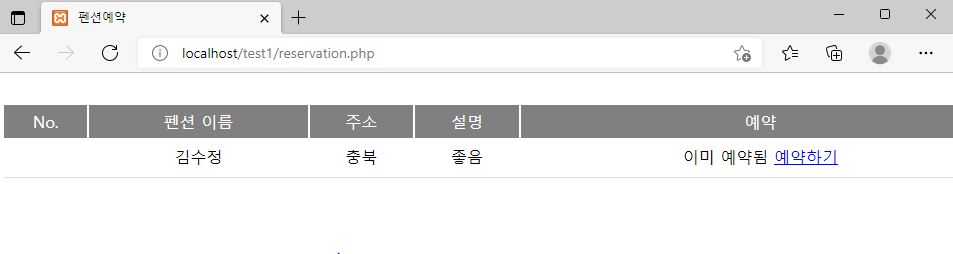
예약을 하지 않아도 사진처럼 이미예약됨(예약하기)처럼 나옵니다
저는 자바스크립트 파일을 따로 넣지 않고 reservation.php 이파일에서 다 처리하고 싶습니다
파일 첨부하겠습니다..
<?php
/*session_start();
if(!$_SESSION['sess_userid']) //로그인하지 않았다면 로그인 페이지로 이동
{
?>
<script>
location.replace("index.php");
</script>
<?
exit;
}
//include "conndb.php";
//$db_link=db_conn(); //데이터베이스와 연결하는 사용자 정의 함수
//mysqli_select_db($db_link,$DB_SNAME); //내부 database 선택*/
$con = mysqli_connect("localhost", "root", "", "tttt");
$sql = " SELECT A.house_id, max(A.house_name) as house_name, max(A.house_address) as house_address, max(A.contents) as contents, count(B.rs_id) as rsCount
FROM tb_house A left outer join tb_house_reservation B
on A.house_id = B.house_id
group by A.house_id
ORDER BY A.house_name asc ";
$resultHouse = mysqli_query($con, $sql);
?>
<!DOCTYPE html>
<html>
<head>
<meta charset="utf-8">
<title>펜션예약</title>
<script src="jquery.min.js"></script>
<script src="jquery-ui.min.js"></script>
<body>
<div style="width:1000px; margin:0px auto; background-color:white; margin-top:30px">
<table style="width:100%">
<tr style="height:33px; background-color:gray; color:white; text-align:center">
<td>
No.
</td>
<td>
펜션 이름
</td>
<td>
주소
</td>
<td>
설명
</td>
<td>
예약
</td>
</tr>
<?php
$idx = 1;
while($row = mysqli_fetch_array($resultHouse))
{
$isReservation = false;
if($row["rsCount"] > 0)
{
$isReservation = true;
}
?>
<tr style="height:33px; text-align:center">
<td>
<? echo $idx; ?>
</td>
<td>
<?=$row["house_name"]?>
</td>
<td>
<?=$row["house_address"]?>
</td>
<td>
<?=$row["contents"]?>
</td>
<td>
<?
if($isReservation)
{
?>이미 예약됨<?
}
else
{
?>
<a style="cursor:pointer; color:blue; text-decoration:underline" onclick="javascript:execReservation('<?=$row['house_id']?>','<?=$row['house_name']?>');">예약하기</a>
<?
}
?>
</td>
</tr>
<tr style="height:0px; text-align:center">
<td colspan=5 style="border-bottom:1px solid #dddddd"></td>
</tr>
<?php
$idx++;
}
?>
</table>
</div>
<div class="box box-success" style="width:500px; display:none; background-color:white; padding-top:15px; padding-bottom:15px" id="winReservation">
<form name=frm method="post" action="reservation_ok.php">
<input type="hidden" name="insert_houseid" id="insert_houseid" value="">
<div style="width:100%; height:33px; margin-left:20px">
<div style="width:30%;float:left">
펜션이름:
</div>
<div style="width:70%;float:left" id="divHouseName">
</div>
</div>
<div style="width:100%; height:33px; margin-left:20px">
<div style="width:30%;float:left">
예약날짜:
</div>
<div style="width:70%;float:left">
<input type="text" name="reservation_date" id="reservation_date" style="width:80px">
</div>
</div>
<div style="width:100%; height:33px; margin-left:20px">
<div style="width:30%;float:left">
숙박인원:
</div>
<div style="width:70%;float:left">
<input type="text" name="total_man" id="total_man" style="width:50px">명
</div>
</div>
</form>
<div style="width:100%; height:33px; margin-top:30px; text-align:center">
<button style="background-color:gray; color:white; border:1px solid #222222" onclick="javascript:saveReservation();">예약하기</button>
</div>
</div><!-- /.box -->
</body>
<script src="jquery.bpopup2.min.js" type="text/javascript"></script>
<script>
function execReservation(houseID, houseName)
{
$("#insert_houseid").val(houseID);
$("#divHouseName").html(houseName);
$('#winReservation').bPopup();
}
function saveReservation()
{
if(!$.trim($("#reservation_date").val()))
{
alert("예약날짜를 입력해주십시오");
return false;
}
if(!$.trim($("#total_man").val()))
{
alert("숙박인원을 입력해주십시오");
return false;
}
if(isNaN($("#total_man").val()))
{
alert("숙박인원을 숫자로 입력해주십시오");
return false;
}
document.frm.submit();
}
</script>
</html>
Recent Posts
질문답변 최근 글
질문답변 게시판의 최근 글입니다.
이전 글
다음 글
X
댓글 작성